
Enterprise Architecture
Monday.com platform architecture: how a Work OS becomes an integration hub
Monday.com looks like a simple boards app. Under the hood it behaves like a Work OS: a data model (boards/items/columns), an automation engine, an app marketplace, and an integration layer. This article maps the architectural layers and the enterprise trade-offs.
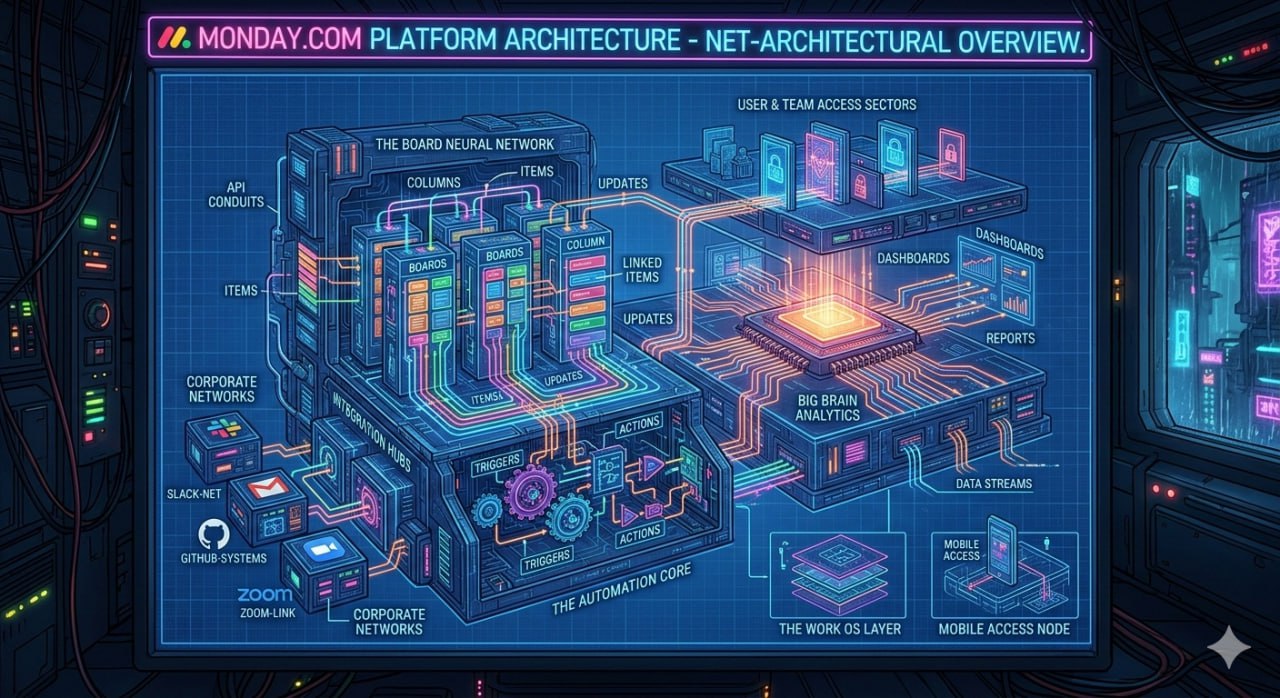
Monday.com is often introduced as a project management / boards tool.
That’s true at the UI level — but the reason it scales inside organisations is architectural: it behaves like a Work OS.
A Work OS isn’t “one app”. It’s a platform pattern:
- a core data model (boards, items, columns)
- an event stream (updates, status changes)
- an automation engine (triggers → actions)
- an integration layer (APIs + connectors)
- a governance surface (permissions, auditability)
1) The core: boards as a domain-agnostic data model
Most SaaS tools start with a domain model (e.g., CRM accounts/opportunities).
Monday’s bet is different: boards + items + columns act like a configurable database table with a collaboration layer.
Architecturally, this gives you:
- repeatable patterns across HR / IT / delivery / marketing
- a consistent query surface for integrations
- a stable “system of record-ish” store for lightweight workflows
Enterprise caveat: once teams treat boards as a database, you’ll see schema sprawl. You’ll want conventions (naming, column types, ownership) and guardrails.
2) The automation layer: event-driven workflows without writing code
The automation engine is what turns “a board” into “a system”:
- triggers: status changes, time-based rules, item created, etc.
- actions: move item, notify, create item, call integration, etc.
From an EA perspective, it’s an event-driven workflow layer embedded in the product.
Key design question for enterprises:
- Which workflows belong in Monday (close to teams), vs in central orchestration (n8n, Zapier, iPaaS, BPM)?
A useful rule:
- Keep team-local workflows in Monday.
- Centralise workflows that require cross-domain governance (finance, security, regulated processes).
3) Integration hubs: where Monday becomes “glue”
The diagram calls out integration hubs (Slack/Zoom/GitHub, etc.). That’s the platform story:
- outbound: push updates to chat, tickets, repos
- inbound: create/update items from external systems
- bi-directional: keep status fields aligned across tools
Architecturally, Monday is acting like a collaboration-centric integration hub.
Risk to manage:
- integration sprawl (many small connectors)
- duplicated logic across automations
- unclear system-of-record boundaries (“is truth in Jira or Monday?”)
4) Access, roles, and the enterprise boundary
As adoption grows, identity and access becomes the real architecture:
- roles and workspace separation
- external guests vs internal staff
- data residency and compliance constraints
Treat this like you would any SaaS platform:
- define workspace/board ownership
- require least-privilege access
- decide what data is acceptable to live in Monday vs your core systems
5) Analytics: dashboards are a product feature — and a governance signal
Dashboards and reporting look like “nice-to-have” features.
But when leaders rely on those dashboards, Monday becomes a management signal system.
That creates new requirements:
- data quality expectations (schema discipline)
- auditing (“why did this KPI change?”)
- stability (breaking a board breaks a report)
In other words: dashboards quietly force you to treat Monday like a platform.
6) A pragmatic enterprise reference approach
If you’re adopting Monday.com at scale, the clean architecture is:
- Monday as the team execution layer (work tracking + lightweight automation)
- Core systems as the record (finance, HR master data, customer systems)
- Integration/iPaaS as the backbone for cross-domain orchestration
- Governance: templates, naming conventions, ownership, and lifecycle rules
Minimum viable governance (doesn’t kill adoption)
- standard templates for the 5–10 most common workflows
- a simple “board schema” checklist (required columns, status meanings)
- integration ownership (who maintains which connector)
- quarterly cleanup (archive dead boards, fix duplicated automations)
7) The architectural takeaway
Monday.com’s long-term value isn’t “boards”. It’s the combination of:
- a flexible data model
- event-driven automation
- integrations
- dashboards
Together, that’s what makes a Work OS behave like a platform, and why choosing one is more than a tooling decision — it’s an integration and governance decision.