
Security
APT28 Exploits CVE-2026-21509: Why This Microsoft Office ‘Bypass’ Needs a Real Incident Response
A newly patched Microsoft Office vulnerability (CVE-2026-21509) is already being exploited in targeted phishing campaigns. Here’s what changed, why it matters, and a practical response checklist for IT and security teams.
A Microsoft Office “security bypass” sounds like the kind of vulnerability you patch at the next maintenance window.
That’s the wrong instinct here.
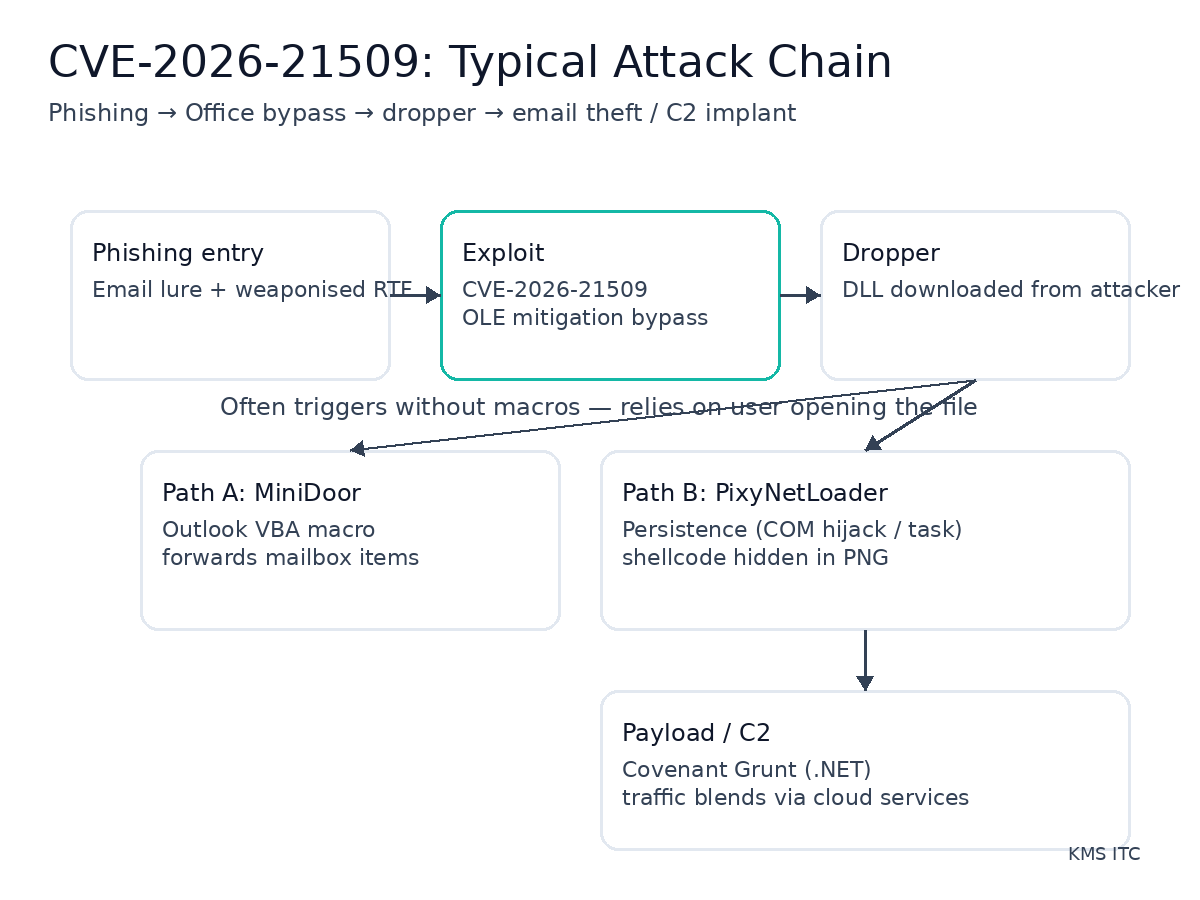
CVE-2026-21509 has already been weaponised in targeted phishing campaigns. In practical terms, this is an initial access play: get a user to open a file, trigger code execution without relying on macros, and drop a loader that can steal email or establish durable command-and-control.
Observed attack chain (Operation Neusploit):
- Phishing email delivers a specially crafted RTF document
- User opens the document — no macro prompt required
- CVE-2026-21509 bypass triggers OLE mitigation escape
- MiniDoor deployed: Outlook-focused email theft via malicious VBA project
- PixyNetLoader deployed: multi-stage loader establishing persistence
- Covenant Grunt delivered: C2 framework enabling long-dwell access and credential theft
1) Executive summary
- CVE-2026-21509 is already being used in real phishing campaigns. Waiting for “mass exploitation” is the wrong trigger for action.
- The exploit path is operationally nasty: it leverages user-opened Office files (often no macros) to kick off multi-stage payload delivery.
- Treat this as patch + hardening + detection, not “just update Office” — because the initial access vector is email and the follow-on TTPs are durable (persistence, credential/email theft, C2).
2) What changed
In the last few days, reporting from multiple sources indicates:
- Microsoft released an emergency (out-of-band) fix for CVE-2026-21509, described as a security feature bypass related to Office OLE mitigations.
- Security researchers observed APT28 / Fancy Bear weaponising the issue in targeted phishing campaigns, using specially crafted RTF documents to start the chain.
- Observed follow-on payloads and tooling include:
- MiniDoor (Outlook-focused email theft via a malicious VBA project)
- PixyNetLoader (multi-stage loader with persistence and additional payload delivery, including Covenant Grunt)
The core operational point: this isn’t “theoretical risk.” It’s already being used against real targets.
3) Why it matters
Most organisations underestimate bypass vulnerabilities because they don’t always map cleanly to “RCE = catastrophic.” In practice, a bypass that reliably enables a dropper is often equivalent to “initial foothold” for:
- Mailbox compromise without account takeover (e.g., email forwarding/stealing from the endpoint)
- Credential and session token exposure via post-exploitation tooling
- Persistence and long-dwell espionage (APT tradecraft aims for quiet access, not loud impact)
Two additional reasons this is worth a priority bump:
-
Email + Office documents remain a top delivery channel. You can’t “train away” all user-open events.
-
Patch velocity is uneven. Attackers bet on the window between an emergency fix and broad deployment across endpoints (including BYOD, contractors, and rarely-connected devices).
4) What to do (checklist)
Use this as a pragmatic 24–72 hour response plan.
Patch and verify
- Deploy the CVE-2026-21509 fix to all managed endpoints with Office installed.
- Force/recommend an Office app restart (service-side protections and config changes often require it).
- Validate coverage: reconcile update compliance with actual device inventory (including “rarely online” devices).
Reduce exposure (email + endpoint hardening)
- Block or quarantine inbound RTF at the email gateway where business impact is acceptable.
- Harden WebDAV / remote content handling (many document chains depend on retrieving content from external locations).
- Enable relevant Microsoft Defender Attack Surface Reduction (ASR) rules and ensure they’re enforced (not just audited), especially for high-risk user groups.
Detect and hunt
- Add detections for suspicious RTF/OLE document opens followed by outbound connections to unfamiliar hosts.
- Hunt for DLL drops in unusual locations and signs of COM hijacking persistence.
- If you have EDR: hunt for patterns consistent with Covenant/Grunt activity and abnormal process trees around Office apps.
Operational readiness
- Brief the Service Desk: provide a one-page “what to report” guide (odd Office doc behaviour, unexpected prompts, Explorer restarts).
- Ensure mailbox monitoring is in place for high-trust users (executives, finance, legal, IT admins).
Risks / tradeoffs
- Blocking RTF can break legitimate workflows. Start with high-risk groups (executives/finance) or quarantine-and-review rather than hard-block everywhere.
- ASR rules can create false positives. Prefer staged rollout: pilot → ring deployment → broad enforcement, but don’t let “perfect tuning” delay action.
- Patch gaps are where incidents happen. The risk isn’t just “unpatched Office” — it’s unknown endpoints, contractors, and laptops that miss update windows.
Sources
- The Hacker News — APT28 uses CVE-2026-21509 in Microsoft Office attacks: https://thehackernews.com/2026/02/apt28-uses-microsoft-office-cve-2026.html
- Help Net Security — Russian hackers exploiting recently patched Office vulnerability: https://www.helpnetsecurity.com/2026/02/03/russian-hackers-are-exploiting-recently-patched-microsoft-office-vulnerability-cve-2026-21509/
- Zscaler ThreatLabz — Operation Neusploit technical analysis: https://www.zscaler.com/blogs/security-research/apt28-leverages-cve-2026-21509-operation-neusploit