
AI Tooling
OpenClaw: a Local AI Assistant That Actually Acts (Tools, Memory, Cron, Browser Relay)
A practical, engineering-focused walkthrough of OpenClaw’s architecture and configuration—how tools, memory, cron jobs, and browser relay combine to turn prompts into real actions.
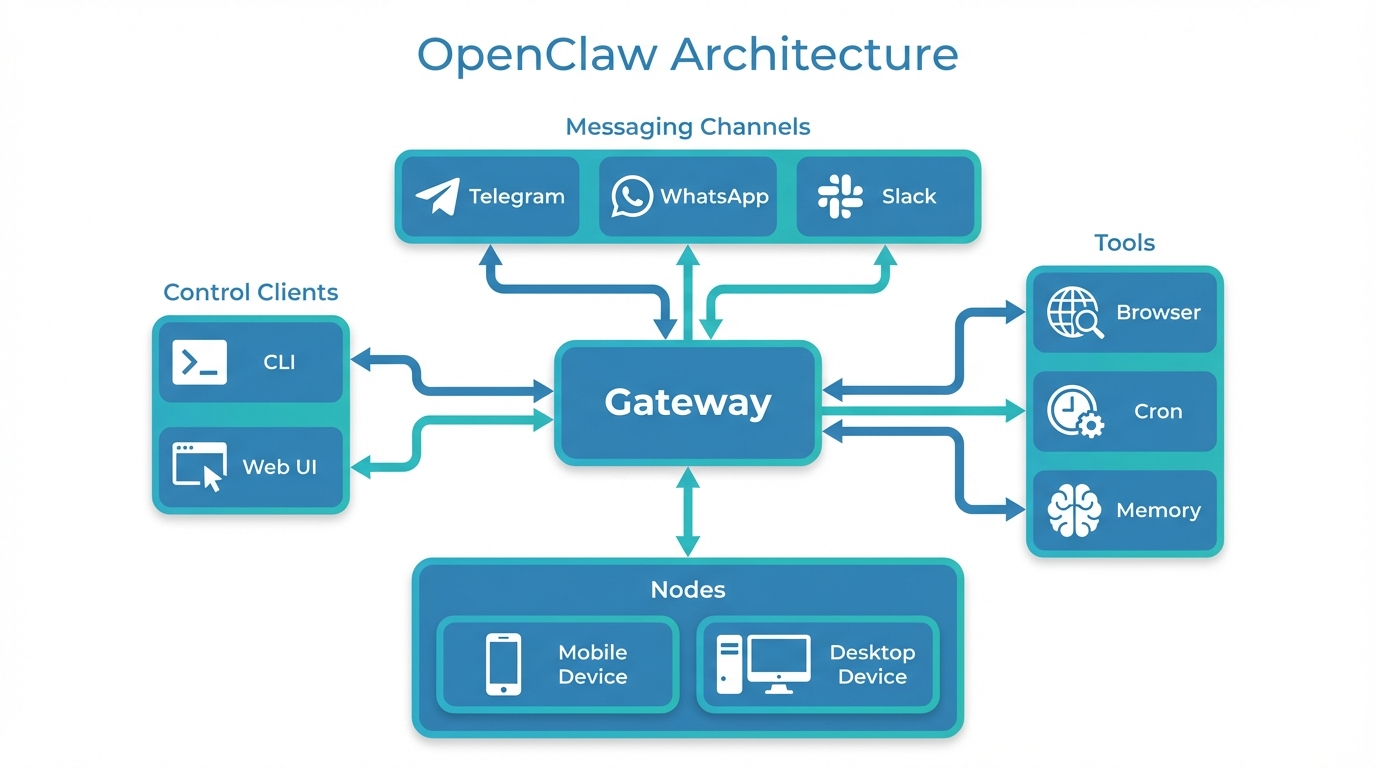
OpenClaw is my “local AI assistant that actually acts”. Not a chat window that only talks back—a system that can use tools, remember context, and schedule follow-ups across real workflows.
This post is a practical walkthrough of how OpenClaw is put together and how I configure it in a way that’s useful for day-to-day engineering and consulting work.
The mental model: one Gateway, many surfaces
At the centre is a long-lived Gateway process. It’s the hub that connects your messaging surfaces (Telegram/WhatsApp/etc.), exposes a control plane (CLI/Web UI), and brokers tool execution.
Gateway — core responsibilities:
- Single owner of provider sessions (messaging auth stays stable)
- Tool orchestration: browser automation, cron reminders, file operations
- Event-driven operations: scheduled jobs, heartbeats, device/node events
Why the Gateway matters
- Single owner of provider sessions (so messaging auth is stable)
- Tool orchestration (browser automation, cron reminders, file operations)
- Event-driven operations (scheduled jobs, heartbeats, device/node events)
In practice, this is what makes OpenClaw feel less like “a chatbot” and more like a personal operations layer.
From prompt to action
OpenClaw’s most useful feature is the loop that turns a natural language request into a concrete outcome:
Natural language request
        │
        ▼
  Intent parsing + context loading (memory, tools available)
        │
        ▼
  Plan: select tools + sequence of actions
        │
        ▼
  Execute (browser, file edits, search, messaging)
        │
        ▼
  Result + optional follow-up scheduling
Typical examples:
- “Draft a cover letter for this job description” → produce a tailored document.
- “Update my resume for X role” → edit files in a repo and push changes.
- “Remind me to enrol before the census date” → create multiple timed reminders.
The building blocks that make it work
1) Tools (doing real work)
Tools are how the assistant acts. In my setup, the most valuable ones are:
- Browser automation: navigate, click, fill forms, take snapshots.
- Web search/fetch: fast research with sources.
- File editing: generate/update documents and code.
- Messaging: send proactive notifications.
The key is keeping tool use auditable and minimal—do the smallest safe action that gets progress.
2) Memory (so it doesn’t forget the important stuff)
OpenClaw uses a lightweight file-based memory approach:
- Daily notes capture what happened.
- Curated long-term memory stores stable facts (preferences, ongoing projects).
This matters because most “assistant failures” come from context loss. When memory is explicit and editable, it becomes part of your workflow rather than a hidden model state.
3) Cron jobs (automation without babysitting)
If you’ve ever said “remind me next week” and then forgotten anyway, cron is where the assistant becomes genuinely useful.
I use cron for:
- deadline reminders (enrolment close dates, census dates)
- multi-step follow-ups (“check again tomorrow”)
- recurring checklists (weekly reviews)
The principle: schedule the next action at the moment you think of it.
4) Browser Relay (when login context matters)
Some tasks need an authenticated browser session (e.g., posting, uploading, forms). OpenClaw supports controlling existing Chrome tabs via a relay/extension workflow.
This is important because it avoids two common problems:
- copying credentials into automation scripts
- brittle headless flows that break whenever a website changes
Instead, you attach a real tab and the assistant can automate within that context.
How I keep it “real” (not AI theatre)
A useful assistant is judged by outcomes, not demos. My rules:
- Start with prototypes, but write down the repeatable parts (checklists, templates, scripts).
- Prefer retrieval over invention (cite sources, link to files, show diffs).
- Keep security explicit (least privilege, don’t leak sensitive data into prompts, avoid irreversible actions).
- Measure usefulness: if a workflow doesn’t save time twice, it’s not a workflow.
Where this goes next (KMS IT angle)
For KMS IT consulting, the real opportunity isn’t “AI features”. It’s AI-enabled delivery:
- faster proposal drafting (with a consistent voice)
- reusable engagement playbooks
- automated documentation updates
- internal developer tooling and knowledge base search
If you’re curious about how we apply this in practice—especially for small teams that want leverage without heavy platform investment—reach out and I’ll share what’s working and what’s not.